Solutions

Six real drawing-delivery scenarios

TuMo Vision is not a generic image-recognition tool. It serves one concrete chain: a drawing arrives, dimensions are detected and reviewed, balloons are numbered, three delivery files go out. Below we break that chain down by industry — where it jams, and how we connect it.

Match the scenario first

If two or more of these sound familiar, the free quota is enough to validate the full workflow.

  • More than 20 drawings a month, or spikes in peak season
  • First-article inspection needs full-dimension balloons
  • Supplier drawings arrive in mixed formats and styles
  • Revisions must be compared dimension by dimension
  • Inspection records and ballooned drawings stop matching

200 free detections are enough for one complete delivery trial.

Scenarios

Six frequent scenarios, six kinds of friction

Industries differ, but the friction clusters: copying data, inconsistent numbering, mixed formats, revisions that no longer line up.

Machining and custom parts

Job shop / custom partsProcess engineer · Inspector
Typical situation
High variety, low volume. Drawings arrive per customer with no shared annotation style, and first-article inspection still needs full-dimension records.
Where it jams
Every drawing means copying dimensions by hand, ballooning by view and laying out an inspection sheet — the rhythm is lost to repetition.
How TuMo fits
Import PDF / PNG / JPG, detect dimensions and extract OCR values locally, review item by item and let balloon numbers generate automatically. Ballooned PDF and Excel detail sheet export in one run.
Deliverables
  • Full-dimension balloons
  • Excel detail sheet
  • First-article report

Quality labs and third-party inspection

Quality / labInspection engineer · Quality lead
Typical situation
First article, sampling and incoming inspection all need traceable records, and customer audits check balloon numbers one by one.
Where it jams
Balloons, measured values and reports drift apart, and a drawing revision invalidates the old inspection record.
How TuMo fits
Numbers stay tied to feature positions; the Excel sheet carries index and tolerance; reports use templates and field mapping, and revision comparison produces a change list.
Deliverables
  • Inspection report
  • Numbered detail sheet
  • Change list

Supplier incoming inspection

SQE / supply chainSQE · Incoming inspection
Typical situation
Suppliers come from different plants; drawings arrive as PDFs, scans and phone photos with different annotation habits.
Where it jams
Every supplier has its own convention, inspectors re-read the drawing each time, and the summary is reformatted again.
How TuMo fits
One PDF / image entry point feeds the same detection and review flow, with one numbering rule and one report template for side-by-side comparison.
Deliverables
  • Consistent balloons
  • Incoming detail sheet
  • Supplier report

Automotive parts and batch parts

Batch production / tight taktProject engineer · Quality engineer
Typical situation
A project delivers dozens or hundreds of drawings at once, with tight deadlines before sample submission and SOP.
Where it jams
Detecting and exporting drawing by drawing eats the schedule; an interrupted run has to be re-queued by hand.
How TuMo fits
Batch jobs detect, review, number and export across files and pages, resume after interruption and save results per page.
Deliverables
  • Batch balloons
  • Batch Excel sheets
  • Batch printing

Sheet metal, structures and stampings

Simple drawings, high volumeProcess · Inspection
Typical situation
Each drawing is simple, but there are many similar drawings with repeating annotation positions and tolerance habits.
Where it jams
Simple drawings are easy to mis-copy precisely because nobody wants to check every item by hand.
How TuMo fits
Batch import, unified detection and numbering; similar drawings reuse templates and field mapping, and OCR review focuses on low-confidence items.
Deliverables
  • Consistent numbering
  • Templated reports

Customer revisions and drawing iterations

Frequent revisionsProject engineer · Supplier quality
Typical situation
Customers revise drawings often; dimension and tolerance differences must be confirmed before production and inspection are updated.
Where it jams
Small tolerance changes are easy to miss by eye, and a revision note that only says "see new version" gives the floor nothing to check against.
How TuMo fits
Load the old and new drawing, compare dimensions, tolerances and features, then export a change list that records what moved.
Deliverables
  • Change list
  • Side-by-side view
Batch

A whole project, run in one pass

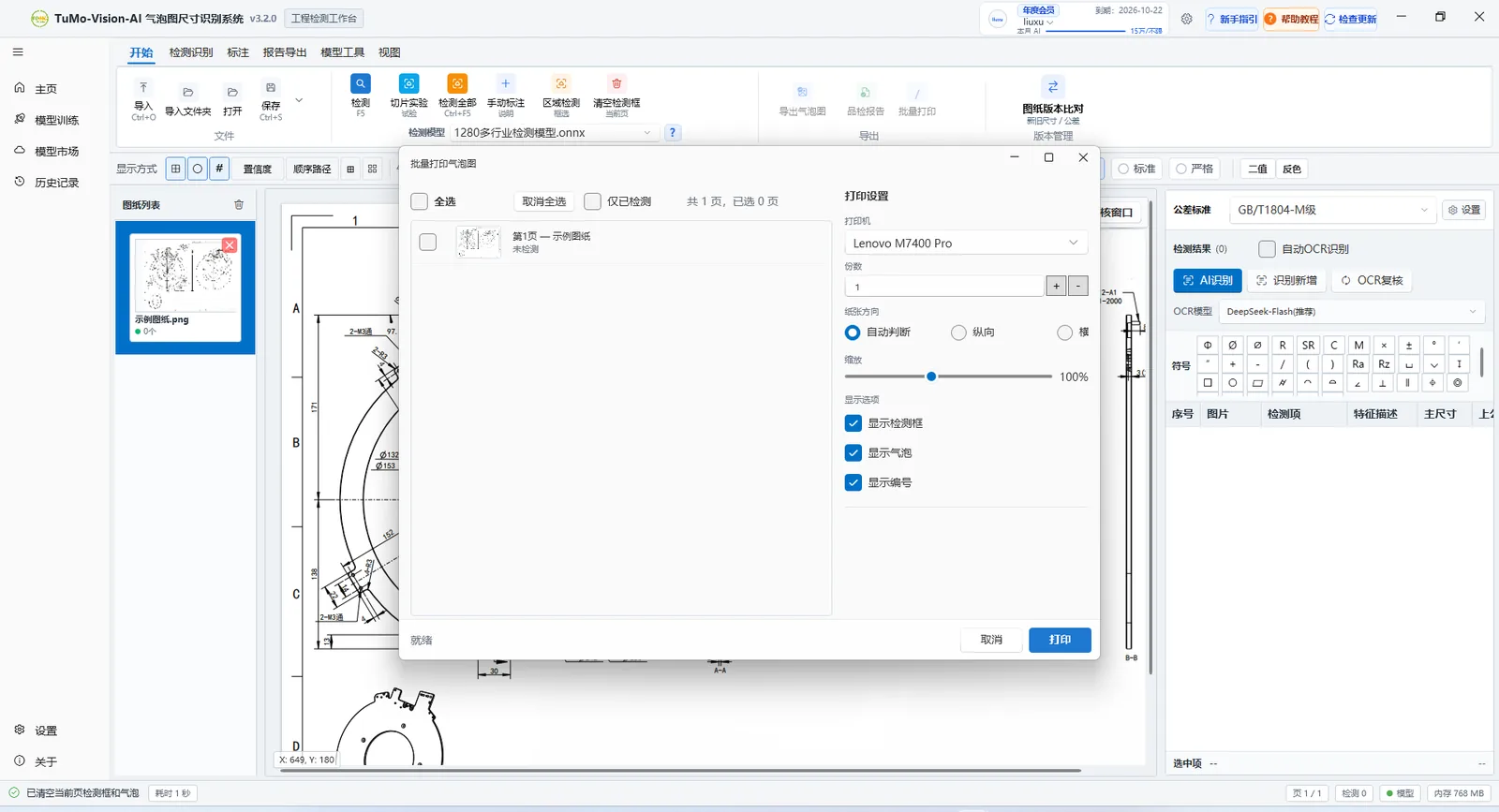
Batch jobs run across files and pages, with detection, review, numbering and export in one queue. Batch balloon printing lets you choose pages, scale and overlays.

  • Mixed multi-page PDF and images
  • Resumable jobs, results saved per page
  • Consistent naming for archiving
See the full feature set
TuMo Vision batch processing and balloon printing interface
Revisions

When a new revision lands, see the difference first

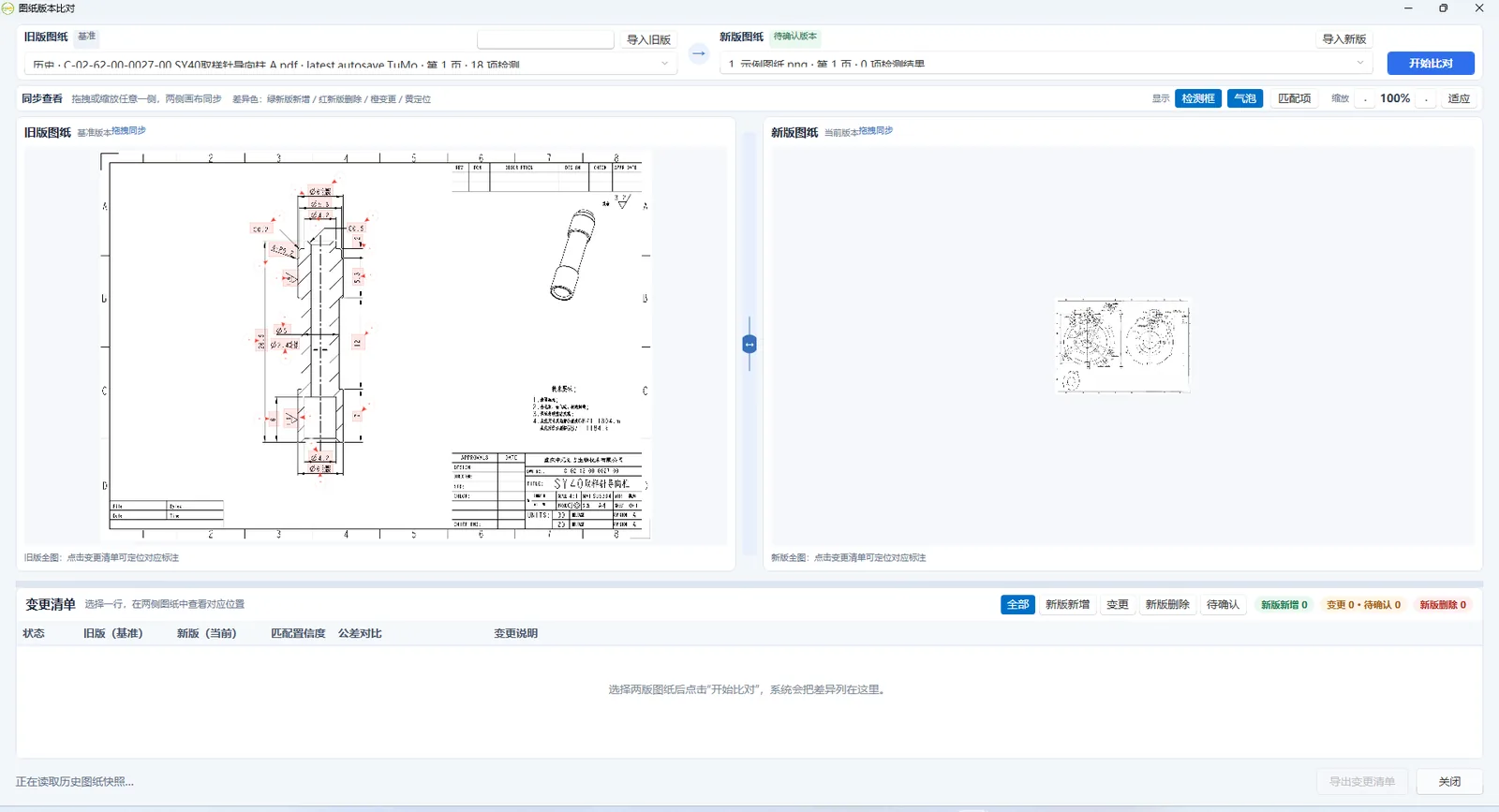
Load old and new drawings side by side and list added, removed and changed dimensions and tolerances. Each row locates the annotation on the drawing.

  • Synchronised zoom comparison
  • Status and match confidence per change
  • Export the list as a review record
See the full feature set
TuMo Vision drawing revision comparison interface
Two ways

The same job, done two ways

We do not promise a magic one-click. The difference is which actions go to the software and which judgements stay with people.

The manual way
  • Hunt for dimensions in CAD / PDF and retype them into Excel
  • Number balloons by hand and draw the leader lines
  • Rebuild the report by copy and paste every time
  • Compare revisions by eye across two drawings
With TuMo Vision
  • Detect dimensions and OCR values locally, review each item
  • Auto-grouped balloons that avoid dimension lines
  • Export ballooned PDF, Excel and report from one template
  • Compare revisions and list every dimension and tolerance change

Recognition still needs a human review — we do not skip that step. But reviewing is much faster than copying from scratch, and reviewed data goes straight into the deliverable.

Import formats
PDF / PNG / JPG
Detection runs
Local CPU / GPU
Default tolerance
GB/T 1804
Industry models
1280+
About references

On customer references, we tell it straight

TuMo Vision is still early. There is no wall of customer logos on this page, no invented testimonials and no borrowed certificates.

  • Real usage examples and trial feedback are available on request, with the customer’s permission
  • We can arrange a demo around your industry and delivery workflow
  • You can also validate with the 200 free detections using your own drawings

Take one of your drawings through the chain

Import a real drawing after installing: detect, review, number, export, and judge for yourself whether the ballooned PDF and Excel fit the way you deliver today.