Tutorial

Five steps to your first drawing

Follow the flow once from import to export and you will see the whole delivery. The client ships with a sample drawing, so you can try detection, review and export even before you have a drawing of your own.

Time needed
About 10 minutes
Requirements
Windows 10 / 11
Free quota
200 detections
01 Import · About 2 minutes

Import a drawing

Open the client and go to Home. Use Import to pick a PDF or images, or import a whole folder. Multi-page PDFs are split into separate pages you can process one by one.

  • PDF / PNG / JPG / JPEG / BMP, multi-page PDFs managed per page
  • No drawing at hand? Use the built-in sample drawing
  • Projects can be saved and resumed later

Process one page first to check the model and confidence, then run Detect All.
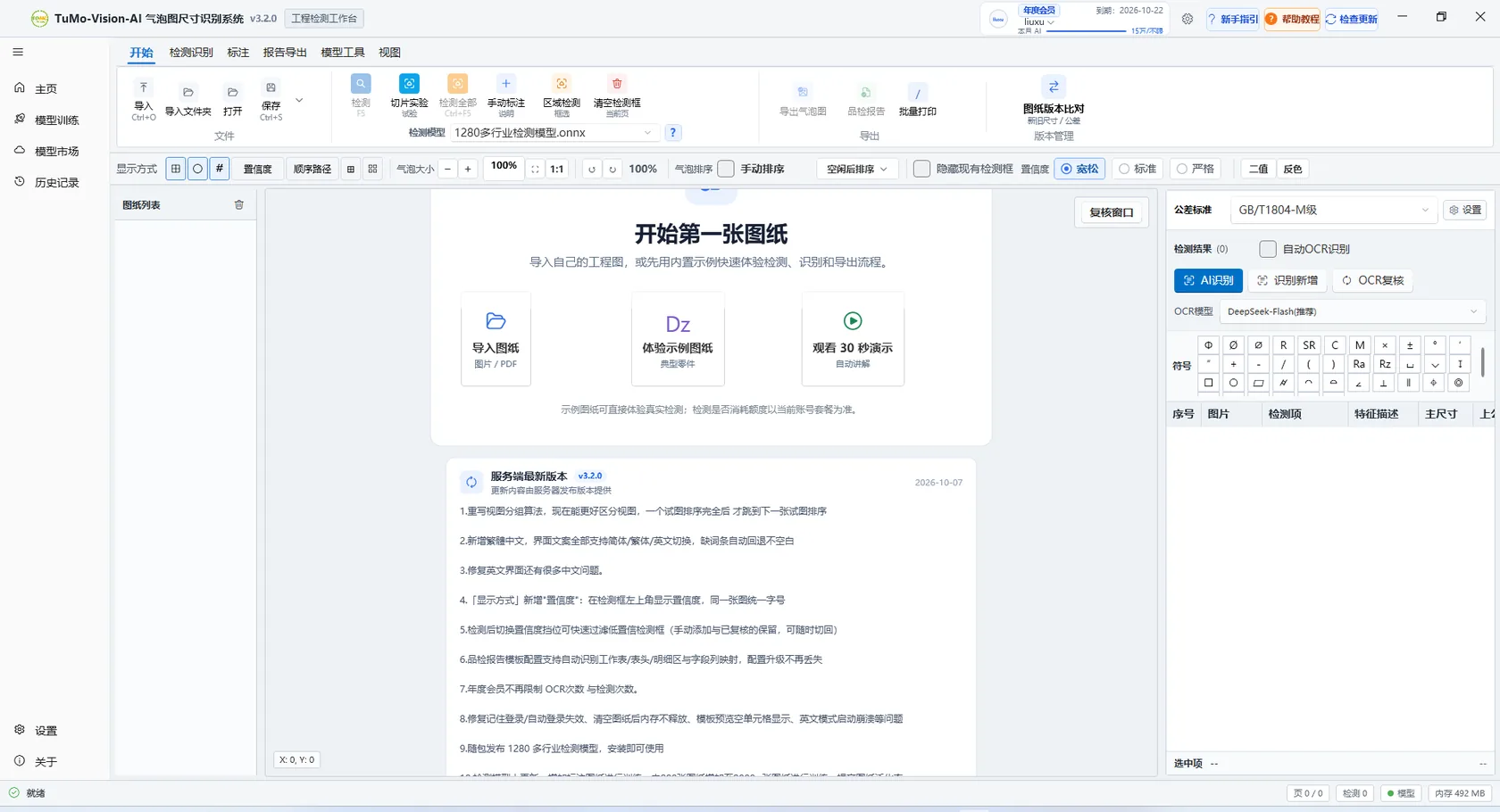
TuMo Vision home screen with import, sample drawing and update notice

Home: import a drawing or use the sample drawing
02 Detect · About 1s

Detect dimensions

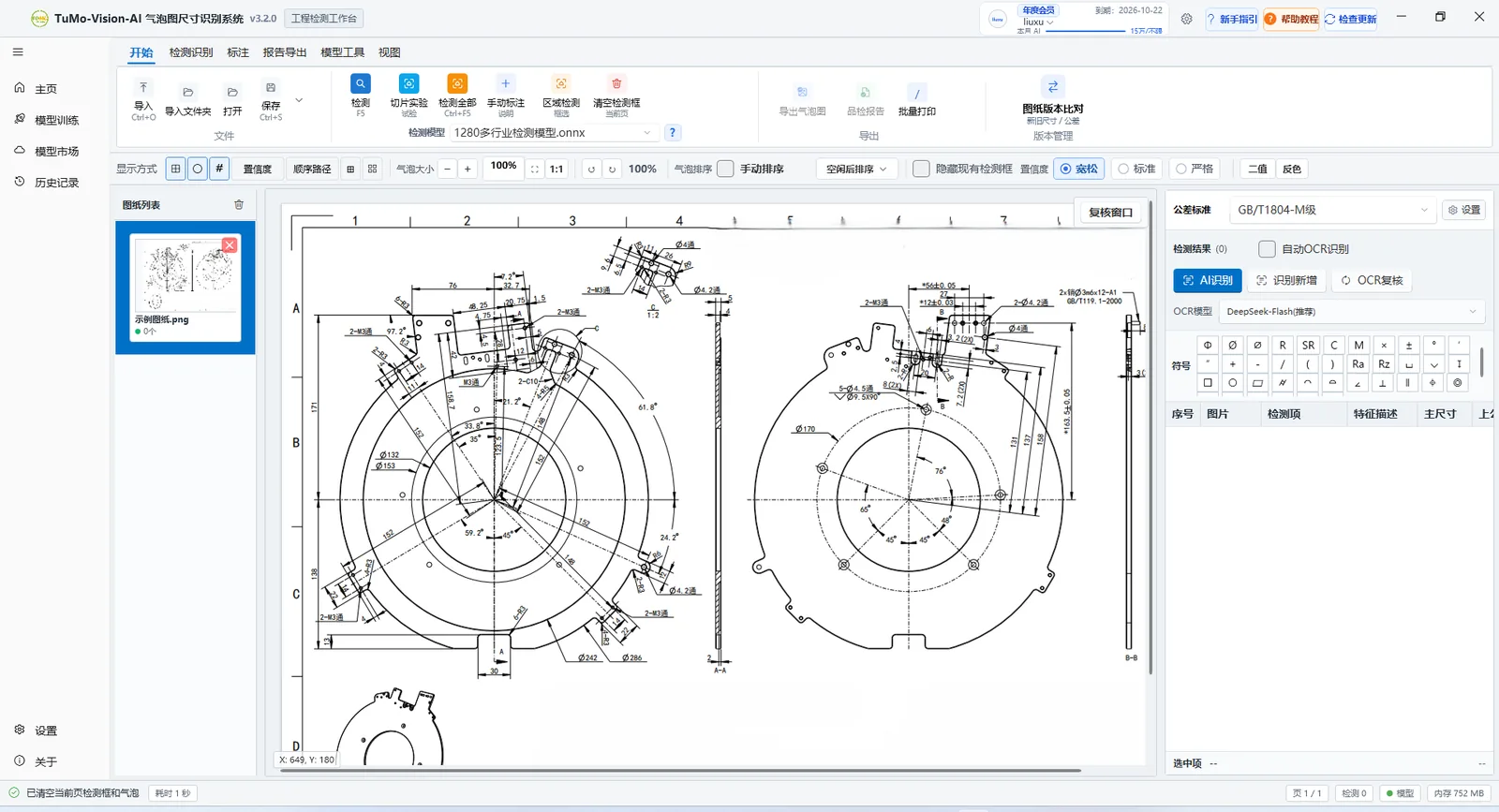
Detection runs on a YOLO vision model: choose a model and confidence, then run Detect Current Page — the whole sheet is framed without selecting a region. Text is read in the next step; a typical drawing takes about one second.

  • Usual confidence range 0.20–0.50: lower for missed items, higher for false positives
  • When few boxes appear, run the missed-item scan
  • For dense or large drawings, compare slice settings in the slice experiment

1280+ industry models are bundled, so the default model usually works for a first run.

Workstation canvas with a loaded drawing, page list and results table

Check the canvas first: are all annotation regions boxed?

03 Review · About 3 minutes

Review OCR results

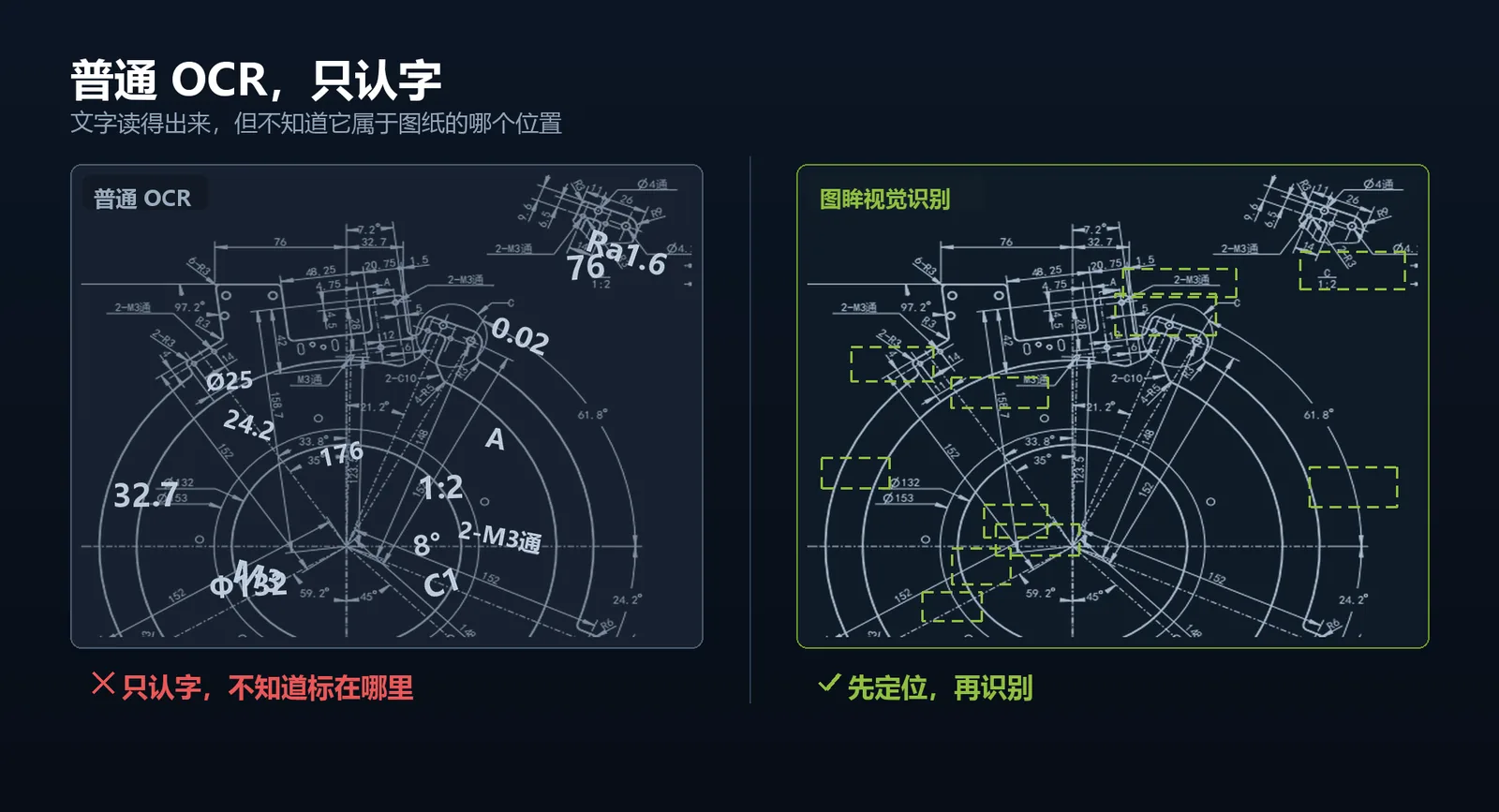
Click AI Recognise to run the vision model on dimensions, tolerances and symbols (cloud OCR uses DeepSeek). Re-run failed items with OCR Re-check, or double-click a table cell to correct it directly.

  • Default tolerance standard is GB/T 1804-m and can be switched
  • Symbol palette inserts φ, R, ± and GD&T symbols
  • Warning rows are highlighted; review them before export

For vertical or wrongly oriented text, rotate the thumbnail 90° and recognise again.

Comparison of plain OCR and locate-then-read recognition

Recognition logic: locate the annotation box, then read the text

Download the client and follow along

The installer is self-contained; sign up and you get 200 free detections.

04 Balloon · About 1 minute

Generate balloons

After detection and review, generate balloon numbers and leader lines: numbers are grouped per view and stay sequential without jumping, and balloons and leaders automatically avoid dimension lines so annotations stay clear. Balloons, numbers and leaders can each be shown or hidden on the canvas.

  • Grouped numbering per view — numbers stay sequential
  • Balloons and leaders avoid dimension lines
  • Positions can still be adjusted by hand
  • Balloon size, box style and line style configured once in settings
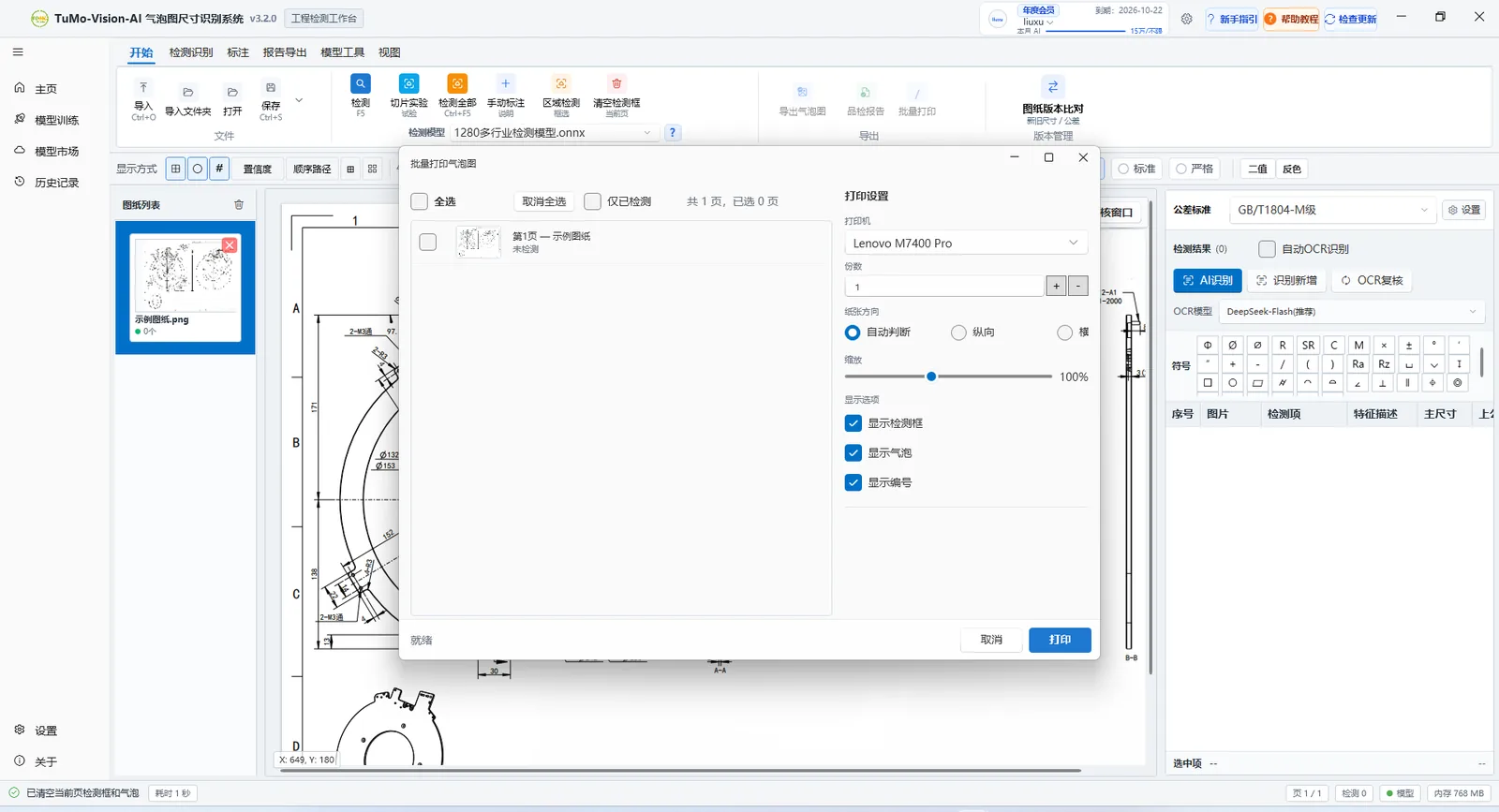
  • Batch balloon printing selects pages, scale and overlays

Regenerate numbering after editing boxes or results so numbers stay in sync.

Batch balloon printing dialog with page selection, scale and overlay options

Batch balloon printing: pages, scale and overlays

05 Export · About 2 minutes

Export the deliverables

Once results are confirmed, export the ballooned drawing, Excel detail or inspection report from the ribbon. Three deliverable types, three export entries.

  • Ballooned drawing: PDF or images for printing and archiving
  • Excel detail: structured results for statistics or downstream systems
  • Inspection report: written into a customer Excel template, configured first

Before the first inspection report, configure a template under Settings → Export, or use the built-in one.

03 ×

You end up with three files

  • Ballooned PDF

    Numbers and leader lines the inspector checks against.

  • Excel detail

    Items, nominal, tolerances and limits.

  • Inspection report

    Generated from your customer template.

Download the client
First run

A sensible order for the first trial

You do not need to run a whole set. Validate on one page, then decide how it fits your daily workflow.

The 200 free detections are enough for several rounds of validation; no membership is needed to evaluate.

  1. Start with your most common drawing type, not the hardest one
  2. Check the number of boxes, especially near edges and dense blocks
  3. Spot-check ten critical values and their upper/lower limits
  4. Export one ballooned drawing and check numbering on paper
  5. Try an inspection report with your own Excel template
Next level

Report templates and dedicated models

Once the basic flow works, these two paths decide long-term efficiency.

Inspection templates

Detect the worksheet, header and detail area of a customer Excel file, map field columns visually, or let AI configure it.

Related features

Training loop

Save corrected results as samples, generate a training script and train a detector for your own drawing types.

Related features

Model market

Search and enable shared ONNX models in the client, or import your own and switch per drawing type.

Related features
Troubleshooting

If you get stuck, start here

The four issues new users hit most, usually solved in minutes.

No dimensions are detected. What now?

Lower the confidence by one step or switch the detection model; compare slice settings on dense drawings; then run the missed-item scan around edges, dense blocks and vertical text.

A recognised value is wrong.

Rotate vertical or wrongly oriented text 90° and recognise again; retry with OCR Re-check; check the tolerance standard and symbol format; correct the row by hand and save the project.

The inspection report says there is no data.

Confirm the current page has been detected, results are not ignored, and the page is selected for export. If you only detected one page, the report only contains that page.

GPU is unavailable or detection is slow.

Switch the inference device to CPU or DirectML under Settings → Detection and finish the work first; then check drivers and CUDA against the GPU vendor documentation. CPU works, just slower.

More frequently asked questions

Need the full walkthrough with screenshots? Open the illustrated guide (new tab)

Ten minutes to your first drawing

Installation takes a few minutes and sign-up includes 200 free detections. Finish the five steps and you have your first deliverable ballooned drawing and report.